Repository navigation
react-native start giving Invalid regular expression invalid error #26598
Description

React Native version: 0.61
I followed following link to get started with react-native
Getting started with react native
I tried to create native app without expo so i as per documentation i followed following command
Steps To Reproduce
Initial commands
npm install -g react-native-cli
react-native init AwesomeProject
After run android command
react-native run-android
It gave me following error on emulator

enter image description here
So i used start command to run metro server
react-native start
This command gave me another error in console
Snack, code example, screenshot, or link to a repository:
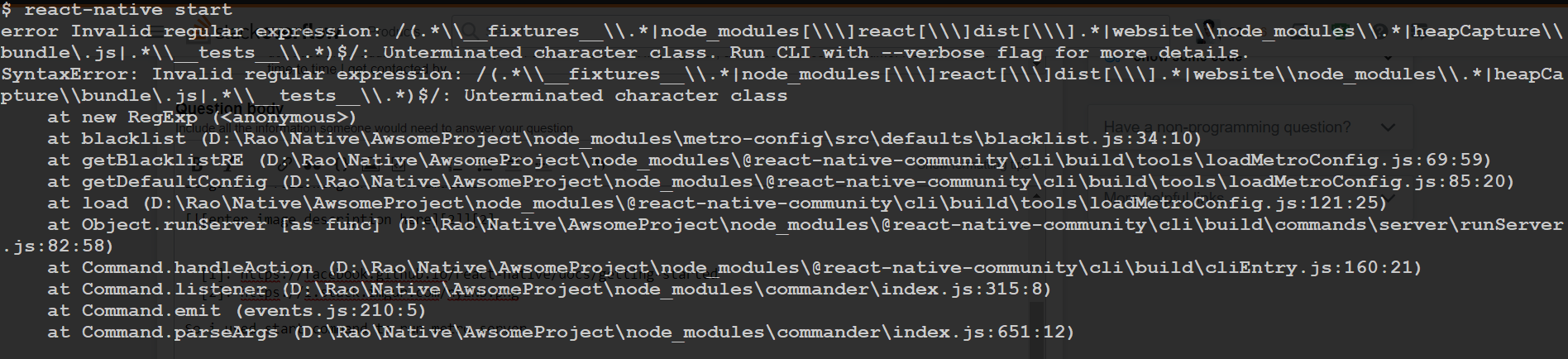
Describe what you expected to happen:
Was expecting it to bypass command successfully and app to run on android
Reacted by Tadas Talaikis, Ian Oderon, Frieder Bluemle, Ricardo Barbosa Morgilli Rogerio, akbar, Yanral Apdy, Coruscate5, Nikita Ulyantsev, Rayhan Yulanda, Alexander and 45 more
Activity
Coruscate5 commentedon Oct 10, 2019
12.8 works for the time being - separate issue #26808 opened about the same problem
halkliff commentedon Oct 10, 2019
Actually, the version 12.10.0 is the latest that works. Still, the regex is incorrect nonetheless, and the newer versions of node won't tolerate it anymore, so it needs to be fixed.
It won't affect older versions, but surely will enable to be used in newer ones.
momozizi commentedon Oct 12, 2019
i had same problem:
react-native starthas errorand after running
react-native run-androidmy android device show methen I tried to run
choco unistall nodejdand runchoco install nodejs-ltsbutreact-native start has that error). so I runreact-native infoand result is:I could not find my answer.
UK-Adam commentedon Oct 22, 2019
Having the issue with the new lts version so previous fixes will no longer work (as with the current latest 13.0.0) . As halkliff said, the lts version is now changed to 12.13.0. Can get it to work if you get 10.16.3 from https://nodejs.org/dist/
GrayYoung commentedon Oct 23, 2019
Nodejs 12.13.0 still will cause this issue.
JasonHughes94 commentedon Oct 25, 2019
Hey, as stated above with the release of Node 13 this had made the LTS now 12.13.0.
You can revert back to
12.9.1and this works as intended.Is there a plan on this being fixed for the latest versions of Node?
FLGMwt commentedon Oct 25, 2019
+1 on re-open, especially considering that the current LTS demonstrates this issue.
As @JasonHughes94 mentioned, node
12.9.1seems to be most recent version which does not demonstrate this error. Direct downloads for 12.9.1 can be found here: https://nodejs.org/download/release/v12.9.1/If you're using chocolatey, you can explicitly install this version with the following:
Since this ticket seems to have the most history and context, I think we could reopen this one and close the following:
#26975
#26969
#26878
#26829
#26808
This should be resolved once https://github.com/facebook/metro/pull/464/files is landed and RN is updated to point to the latest.
Fix blacklist regex syntax errors (#468)
armohammadi56 commentedon Nov 1, 2019
It appears in \node_modules\metro-config\src\defaults\blacklist.js, there is an invalid regular expression that needed changed. I changed the first expression under sharedBlacklist from:
var sharedBlacklist = [
/node_modules[/\]react[/\]dist[/\]./,
/website/node_modules/./,
/heapCapture/bundle.js/,
/./tests/./
];
to:
var sharedBlacklist = [
/node_modules[/\]react[/\]dist[/\]./,
/website/node_modules/./,
/heapCapture/bundle.js/,
/./tests/./
];
friederbluemle commentedon Nov 1, 2019
@armohammadi56 - After trying to spot the difference of the two code blocks for 2 minutes, I decided to throw them into text files and
git diff --no-indexthem. Turned out there are no differences. 😂Looks like you accidentally copy+pasted the same. Can you edit your comment?
halkliff commentedon Nov 1, 2019
This issue has been fixed as of #468 in metro.
EugeneDraitsev commentedon Nov 2, 2019
Now instead of editing /node_modules you can add
resolutionsfor metro-config inpackage.jsonas temporary workaround:8bitpravibyte commentedon Nov 13, 2019
I've downgraded to latest stable release 12.13.0, added
resolutionssection inpackage.json, runnednpm installand still got the regex error.EugeneDraitsev commentedon Nov 13, 2019
@8bitpravibyte Try to remove
node_modulesand install it again or maybe try to useyarninstead ofnpm i8bitpravibyte commentedon Nov 13, 2019
@EugeneDraitsev Thanks man, it worked.
I've deleted
node_moduleswhich were inC:\Users\Test\AppData\Roaming\npm\node_modules\react-native, because in my error the path for the blacklist.js file was this, installedreact-native-cliagain and usedyarnto install them again.nahidmbstu commentedon Nov 16, 2019
React native setup is painful on win .... i have stuck for 1 day for this problem.
ahaq0 commentedon Nov 18, 2019
Can you explain why this is a problem though?
ahaq0 commentedon Nov 18, 2019
For the record I'm still getting it after doing everything suggested in this thread running on Windows 10.
ahaq0 commentedon Nov 18, 2019
error Invalid regular expression: /(.\fixtures\.|node_modules[\]react[\]dist[\].|website\node_modules\.
|heapCapture\bundle.js|.\tests\.)$/: Unterminated character class. Run CLI with --verbose flag for more detai
ls.
8bitpravibyte commentedon Nov 18, 2019
@ahaq0 I am on Windows 10, what I did is the following:
react-native init appName --version="0.60.0"node_modules\metro-config\src\defaultsthere you will seeblacklist.js, you can open it and edit the sharedBlacklist variable (array with regexs) by removing all/(forward slash symbol) which are not in the begging or in the end of a row (if there are 4-5 rows of regex, you should leave there only the first and last forward slashes)react-native start(to start a metro server)cd appName && react-native run-androidin the first terminal window4D10S commentedon Nov 20, 2019
Hi, i have the same problem when i execute
react-native startI tried to follow the steps but i have a problem when i uninstall with choco!
1º
C:\WINDOWS\system32> node -v=>v12.13.02º
choco uninstall nodejsHow can is possible??? What can i do to uninstall and re-install?
Thanks!
8bitpravibyte commentedon Nov 20, 2019
You can manually uninstall it using the
Control PanelinWindowsand download whatever you want.4D10S commentedon Nov 20, 2019
Thanks!. Done and working
indranil32 commentedon Nov 24, 2019
The mention of this fix should reach - http://facebook.github.io/react-native/docs/troubleshooting#content
Updating the troubleshoot document
SteveLockeUK commentedon Nov 24, 2019
Simplest steps to fix this for me were:
yarn installThaJay commentedon Nov 27, 2019
Thank you, this worked for me.
It's too bad the metro devs were not aware of this issue in time but it's nice Yarn offers options to work around this semi-cleanly.
surya0920 commentedon Dec 2, 2019
Take a look at this hope this works for you:
https://stackoverflow.com/questions/55441230/unable-to-load-script-make-sure-you-are-either-running-a-metro-server-or-that-yo?newreg=834f28d14a0f4de0b6928f6c875beeaf
Go to this file: \node_modules\metro-config\src\defaults\blacklist.js and change this code:
var sharedBlacklist = [
/node_modules[/\]react[/\]dist[/\]./,
/website/node_modules/./,
/heapCapture/bundle.js/,
/./tests/./
];
and change to this:
var sharedBlacklist = [
/node_modules[/\]react[/\]dist[/\]./,
/website/node_modules/./,
/heapCapture/bundle.js/,
/./tests/./
];
This worked for me!!
smakhtin commentedon Dec 5, 2019
It's still not fixed, why it's closed?
BrandonBlanchard commentedon Dec 5, 2019
This is still very much an issue and should be reopened.
Rananjaya commentedon Dec 8, 2019
It's still not fixed
aliahmedbd commentedon Dec 8, 2019
It worked for me, thanks for the solution.
ThaJay commentedon Dec 11, 2019
@smakhtin @BrandonBlanchard @Rananjaya I can advise you to read the topic. It is fixed and at some point the fix will land in your env. I agree it should have been fixed before it broke but these things happen. Metro devs are human just like the rest of us (I assume 😉).
#26598 (comment)
luk3skyw4lker commentedon Dec 26, 2019
I'm getting the same problem here.
fatlun1981 commentedon Dec 27, 2019
This work for me as well, but I have to change the express a bit:
var sharedBlacklist = [
/node_modules[\]react[\]dist[\]./,
/website/node_modules/./,
/heapCapture/bundle.js/,
/./tests/./
];
I am on Windows 10, and using Anaconda.
Mskirvk commentedon Dec 28, 2019
Only solution that worked for me was to downgrade node to the version of 12.9.1.
Thanks! :)
jcolon1984 commentedon Dec 29, 2019
The solution *** uninstall react native and move to an actual stable platform.
sonuame commentedon Dec 29, 2019
This sucks..!!!
sonuame commentedon Dec 29, 2019
Setting it up to 12.9.1 worked
yusufdonmez commentedon Jan 1, 2020
changing blacklist.js file for '/' slashes is temporary solution. after adding new dependency or 'npm install' or 'yarn add' commands you have to do it again.
I listen advives to downgrade nodeJS to 10.16.3 maybe 12.9.1 also works.( uninstall nodejs choco uninstall or windows program uninstall page, download versions from here whichever you want to try. ). I also init new project with optin --version="0.60.0" maybe just that worked for me. for my old projects I dont know what to do.
I want permanent solution with a nodejs LTS release.
douglas-pires commentedon Jan 2, 2020
This worked for me.
sonuame commentedon Jan 2, 2020
Instead of changing node version globally, I found "nodist" a better option for changing versions specific to projects.
nodist local 12.9.1will do the magic
aditodkar commentedon Jan 4, 2020
I solved the issue refer this https://iamsapankumar.blogspot.com/2019/10/error-invalid-regular-expression.html?m=1&fbclid=IwAR24kM7FvVFPR9ZTdq6HAmFDvF-Th7MnV2IvS3Yo_F9m6snDFh_QNsr0vgs
j0k3r87 commentedon Jan 4, 2020
This worked perfectly, thank you !
Fix blacklist regex syntax errors (#468)
rodrigogsn commentedon Jan 10, 2020
Worked for me too, thanks.
leo-nerd commentedon Jan 31, 2020
Downgrading to nodejs 10.18.1 did it for me.
netgfx commentedon Feb 8, 2020
downgraded to 12.9.1, via windows uninstall and getting a previous version from here: https://nodejs.org/download/release/v12.9.1/
Terrible bug...
soletan commentedon Mar 9, 2020
Downgrading is not an option if you really care for security. Believe or not, but sometimes newer versions of Node.js are fixing issues you should be concerned about.
Is anyone capable of providing insights on why there is an invalid regular expression or why at least some parser isn't capable of adopting newer capabilities of distinguishing a forward slash inside a character class from a terminating forward slash? Please, provide details on why there are no upgrades for either involved dependency and why no one's caring on behalf of this project. Eventually this is just proving how error-prone this npm-style of coding is: don't use deps without checking whether they are implemented well enough for your tool. This ain't Lego. According to this thread I sincerely doubt react-native was ever made for lasting long enough to become a favourable platform for software meant to have its own LTS versions ...
Don't downgrade. Otherwise consider downgrading to Windows XP or macOS 9 as well whenever your website does not look any good no more.
herrera-ignacio commentedon Apr 14, 2020
Still hapenning with Node LTS 12.16.2, this should be fixed ASAP...
bbeckkk commentedon May 17, 2020
None of the above solutions worked for me.
So I deleted node from control panel and then install downgraded version
choco install nodejs --version 12.8
Now it is working.
EnduIf commentedon May 25, 2020
A Fix should already be implemented react/metro#468
Well you can try to upgreade to the newest Metro version, stop working or downgrade Node.Js.
Its not like your App uses Node.Js
soletan commentedon May 25, 2020
I'm pretty aware of Node.js not involved in running my app, but it is essential to processing several 100.000+ files for building it. Do you trust all the modules involved in building your application for they are provided by a plethora of different vendors? Do you expect all those files to be free of any vulnerability at any time? Do you believe that neither such vulnerability at build time could affect your application's integrity at runtime?
ThaJay commentedon May 29, 2020
@soletan If the fix is upstream we can only wait for the release or run straight from the repo. I do agree this fix could have been done a while ago.
zaidpathanGit commentedon Jun 11, 2020
For me changing the code into
node_modules\metro-config\src\defaults\blacklist.jsas per following worked.oleksandr-dziuban commentedon Jun 11, 2020
@ThaJay @zaidpathanGit @soletan
Just update
metro-react-native-babel-presetto latest0.59.0version and issue will be fixed.I'm on latest
NodeJS 12.18.0and react-native0.62.2Sid-Shanker commentedon Jun 12, 2020
This worked for me. I updated metro-react-native-babel-preset from 0.51.1 to 0.59.0, and i am using react-native version 0.61.3. npm install and audit fix if needed.
kp47 commentedon Jun 12, 2020
I have this issue. I tried to run the app using different node versions by upgrading and downgrading node but none of them worked.
I get Unhandled JS Exception: Invalid regular expression: Invalid group specifier name.
Any help would be great
stage88 commentedon Jun 13, 2020
Spent a day looking at this, for me nothing mentioned above helped, I checked all packages for upgraded and it turned out to be an issue with 'validator' package, see this issue: validatorjs/validator.js#1354
Edit: also I should say that in debug it was all fine, however as soon as I built in release mode and deployed on a device, I got this error.
profnandaa commentedon Jun 27, 2020
Validator issue mentioned was fixed long ago from our end; let me know if you are still blocked on this.
yashwant-dangi commentedon Aug 1, 2020
This should be fixed
Mitchell-Stone commentedon Sep 21, 2020
I get this error on following the react-360 introductory steps.
Invalid regular expression: /(node_modules[\]react[\]dist[\].|website\node_modules\.|heapCapture\bundle.js|.\tests\.)$/: Unterminated character class
Node version 12.18.4.
Doesn't instill confidence when you can't run the default app supplied for an example.
profnandaa commentedon Sep 21, 2020
@Mitchell-Stone -- can you post a bit detailed error log?
Mitchell-Stone commentedon Sep 23, 2020
@profnandaa
I found that changing the blacklist var worked:
var sharedBlacklist = [ /node_modules[\/\\]react[\/\\]dist[\/\\].*/, /website\/node_modules\/.*/, /heapCapture\/bundle\.js/, /.*\/__tests__\/.*/ ];I did this in the metro-config file