You signed in with another tab or window. Reload to refresh your session.You signed out in another tab or window. Reload to refresh your session.You switched accounts on another tab or window. Reload to refresh your session.Dismiss alert
{{ message }}
Repository navigation
style: use theme tokens for avatar and name input in onboarding (#1656) - #1663
This PR does not contain AI-generated code at all.
This PR contains AI-generated code. I have read the AI Usage Policy and this PR complies with this policy. I have tested the code locally and I am responsible for it.
I have used the following AI models and tools: gemini 3.8 Flash
Checklist
My PR addresses a single issue, fixes a single bug or makes a single improvement.
My code follows the project's code style and conventions
If applicable, I have made corresponding changes or additions to the documentation
If applicable, I have made corresponding changes or additions to tests
My changes generate no new warnings or errors
I have joined the Discord server and I will share a link to this PR with the project maintainers there
Once I submit my PR, CodeRabbit AI will automatically review it and I will address CodeRabbit's comments.
I have filled this PR template completely and carefully, and I understand that my PR may be closed without review otherwise.
Summary by CodeRabbit
Style
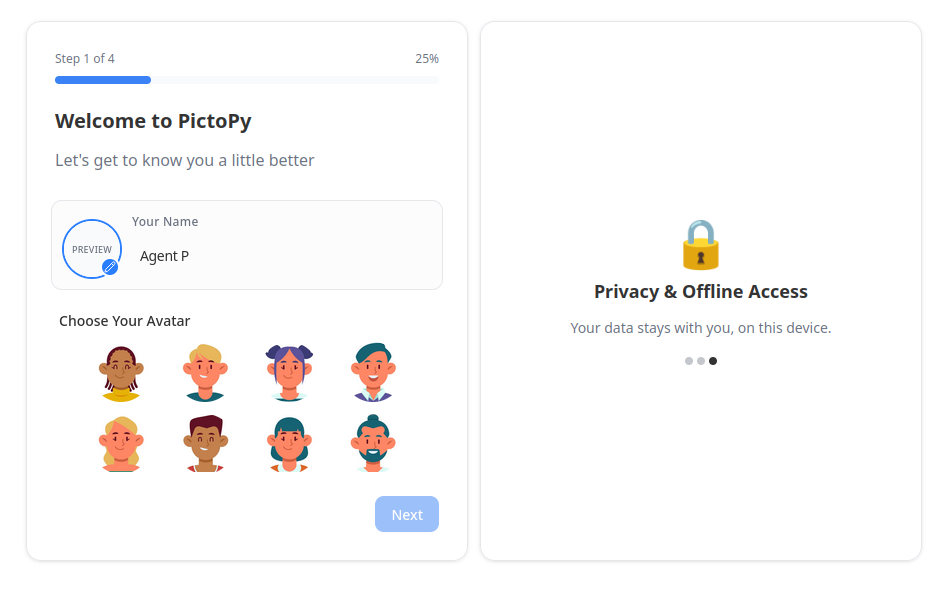
Updated the onboarding avatar and name panel, avatar preview placeholder, name label, and name input to use theme-based background, border, foreground, and muted text colors.
The name input now explicitly uses the theme’s foreground color.
Prakhar1808
changed the title
fix: use theme tokens for avatar and name input in onboarding (#1656)
style: use theme tokens for avatar and name input in onboarding (#1656)
Oct 26, 2026
The avatar-and-name row, empty avatar preview, name label, and name input now use theme-based colors. The input also applies the theme foreground color to entered text.
AOSSIE-Org/PictoPy#1656: The theme-based colors replace the hardcoded colors described in the Light-theme onboarding issue.
Suggested labels: TypeScript/JavaScript
Suggested reviewers: takitxt
Merge Risk: Minimal · up to a8125
No actionable issue is identified; the change is mergeable after normal checks.
Pre-merge checks: 4
Check name
Status
Explanation
Description Check
Check skipped - CodeRabbit’s high-level summary is enabled.
Title check
The title names the main change: onboarding avatar and name input now use theme tokens instead of fixed colors. The raw summary confirms the edits in AvatarSelectionStep.tsx replace fixed neutral colo…
Linked Issues check
Issue #1656 requires theme-compatible colors for the Light-theme onboarding name and avatar controls. The PR replaces fixed neutral colors with theme tokens for the panel, avatar preview, label, place…
Out of Scope Changes check
The reported changes are limited to theme color and input text styling in AvatarSelectionStep.tsx. Each change supports the fix for issue #1656. No unrelated change is identified.
Full details: Title check
Explanation
The title names the main change: onboarding avatar and name input now use theme tokens instead of fixed colors. The raw summary confirms the edits in AvatarSelectionStep.tsx replace fixed neutral colors with theme-based background, border, foreground, and muted text classes, and the linked issue #1656 describes the Light-theme contrast problem this fixes. The title follows conventional commit style and is specific enough for a teammate scanning history.
Full details: Linked Issues check
Explanation
Issue #1656 requires theme-compatible colors for the Light-theme onboarding name and avatar controls. The PR replaces fixed neutral colors with theme tokens for the panel, avatar preview, label, placeholder, border, and input text. These changes address the dark preview background, low-contrast label and placeholder, and low-visibility typed text. The issue states no automated test requirement.
Finishing Touches
Generate unit tests (beta)
Create a new PR
Autofix · Keep fixing CodeRabbit findings and required CI, and resolving merge conflicts
Tip
🎯 Customize your risk assessments
Guide how CodeRabbit assesses merge risk and security architecture risk. Highlight sensitive changes and explain your security boundaries using Merge Risk Instructions and Security Risk Instructions in your review settings. Security architecture risk assessments require the Advanced plan or above.
✅ Automatic approvals, with your rules
Let CodeRabbit approve pull requests once required threads are resolved, pre-merge checks pass, and your risk limits are met. Enable Automatic approvals in review settings, with overrides for teams or file paths.
Thanks for using CodeRabbit! It's free for OSS, and your support helps us grow. If you like it, consider giving us a shout-out.
A rabbit checks the name field's hue, The avatar preview brightens too. Muted borders blend with the theme, Text stays clear across the screen. Hops of color, soft and light, Make onboarding look just right.
CodeRabbit Verify
Run CodeRabbit Verify to test the changes in this pull request.
Included review availability: This review used your included allowance. Your plan provides up to 2 included reviews per hour; 1 remain after this review.
This file contains hidden or bidirectional Unicode text that may be interpreted or compiled differently than what appears below. To review, open the file in an editor that reveals hidden Unicode characters.
Learn more about bidirectional Unicode characters
Add this suggestion to a batch that can be applied as a single commit.This suggestion is invalid because no changes were made to the code.Suggestions cannot be applied while the pull request is closed.Suggestions cannot be applied while viewing a subset of changes.Only one suggestion per line can be applied in a batch.Add this suggestion to a batch that can be applied as a single commit.Applying suggestions on deleted lines is not supported.You must change the existing code in this line in order to create a valid suggestion.Outdated suggestions cannot be applied.This suggestion has been applied or marked resolved.Suggestions cannot be applied from pending reviews.Suggestions cannot be applied on multi-line comments.Suggestions cannot be applied while the pull request is queued to merge.Suggestion cannot be applied right now. Please check back later.


 Prakhar1808
changed the title
 github-actions
Bot
added
bug


Addressed Issues:
Fixes #1656
Screenshots/Recordings:
after the fix
Check one of the checkboxes below:
I have used the following AI models and tools: gemini 3.8 Flash
Checklist
Summary by CodeRabbit