Repository navigation
[Feature] "Accept new snapshot" button in html-reporter / UI Mode #24310
Description

Hi all. Recently, on our project, we introduced screenshot tests using Playwright.
These tests have shown themselves very well - every release they catch UI bugs. We began to increase their number but rather quickly ran into a problem.
Our workflow is as follows: we created a separate project in the Playwright config - purely UI tests, which run separately from functional tests. After the run - we look at the results in the standard Playwright html-reporter. In general, it is quite convenient. It highlights the diffs, you can see both the original and the new screenshot to view - everything is cool.
But relatively often there is such a situation that the test fails for valid reasons. Not because of some bug, but simply because some UI was changed, this is, so to speak, the expected failure. But it is important when looking at failed tests not to miss those that really fail due to bugs.
The problem is that now, after running the tests it is necessary, let's say, to update 20 that fell "validly" and accept new originals for them, but for 5 - it is not necessary, because they fell due to a bug - there is no tool to do so.
You have to run the tests again with --update-snapshots, and the diffs will not be generated in this case. Then you need to sit in your IDE and watch and check which pictures to commit and which not.
Plus, the stability is not always 100%, sometimes there are flake tests, and they also need to be looked at, so they are not accidentally committed, and so on.
In short, it's quite an overhead dealing with this.
The presence of the "Accept new" button for each failed test separately - would completely solve this problem.
Therefore, I really want to have a button like "Accept new golden snapshot", so that for each failed test, a new screenshot can be accepted as the new original, after which, accordingly, it will be replaced on disk in the directory with screenshots, it will appear in the diff in the git, and you will only need to commit it.
Also, it is desirable that pressing this button turns the test into "green", that is, it would turn the test from failed to pass.
I don't know how many people use screenshot tests using Playwright, but I think everyone who does has the same problem. Playwright essentially provides everything you need for screenshot testing, the only thing missing is a convenient way to manage screenshots.
Activity
shadowusr commentedon Jul 20, 2023
Hey. I'm currently working on implementing this feature. Planning on sending a PR today. I'm not a member of playwright team though, so I'll have to get approval and discuss details with them.
shadowusr commentedon Jul 21, 2023
Okay, the accept screenshot buttons themselves are mostly ready:
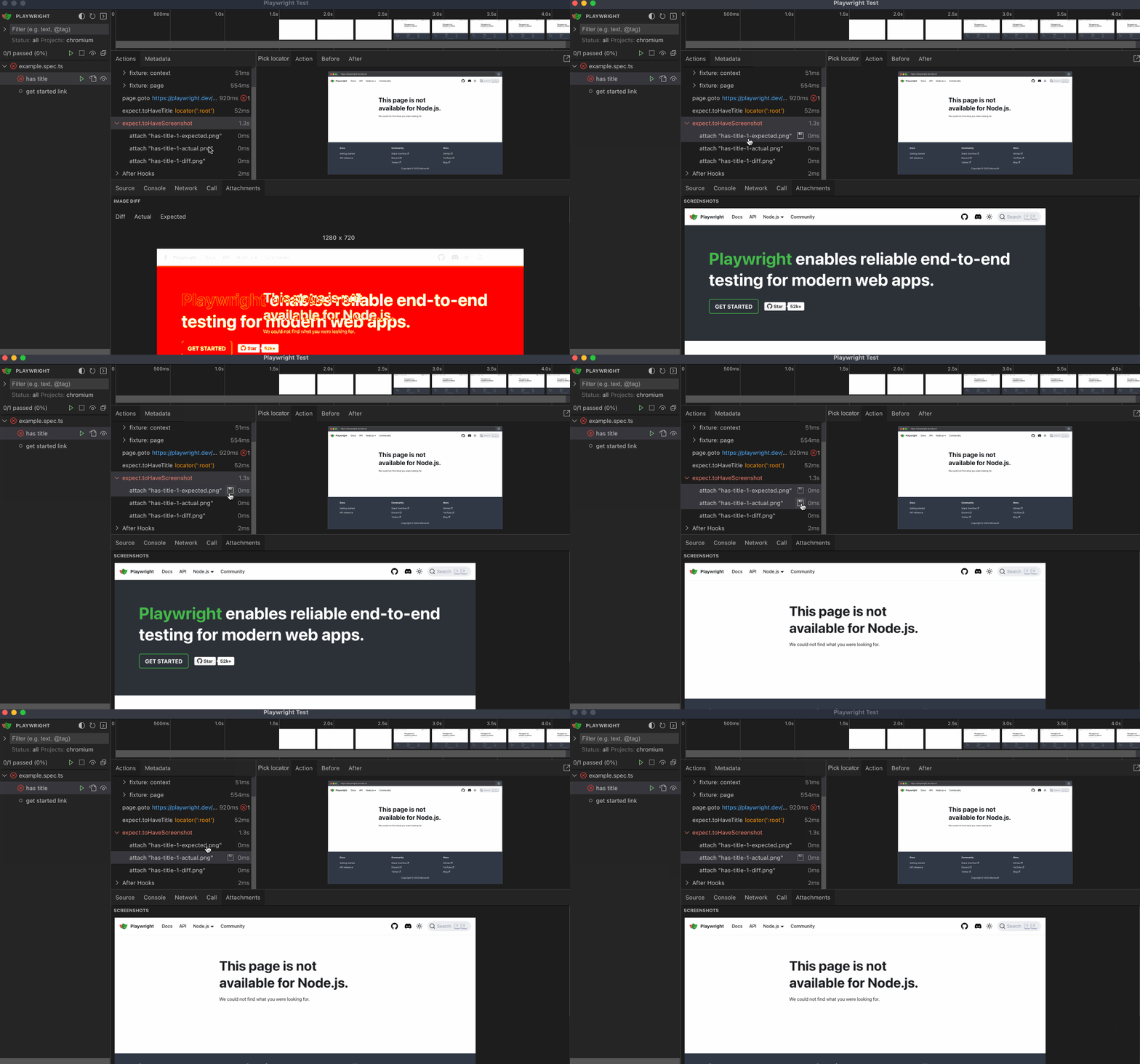
However, I've stumbled into some issues while implementing the aforementioned test status update and need some more time to work things out.
d-ryabtsev commentedon Jul 21, 2023
What is it that you are using to run the tests here? Is that the debugger? We don't run the tests with tracing turned on because that slows down the tests considerably.
shadowusr commentedon Jul 22, 2023
It's Playwright UI mode: https://playwright.dev/docs/test-ui-mode
Usually used to run and debug tests during development locally. You don't have to use tracing in CI to use this.
The feature I'm working on is not connected to static HTML reports or other reports you might generate in your CI runs. I'm adding those buttons specifically to the UI mode.
nikolay-yavorovskiy commentedon Jul 23, 2023
We don't use UI mode, it's not very convenient for us, as I mentioned in the feature title, we want this specifically in the html-reporter.
shadowusr commentedon Jul 23, 2023
Ah, well, then there was some misunderstanding. I'm working on this feature exclusively for the UI mode.
As for HTML report, that's actually pretty non-trivial to implement as of now (if not outright impossible without severe changes to the playwright architecture):
What's preventing you from using UI mode? Maybe we can think in that direction and resolve UI mode issues, to me it sounds more realistic
nikolay-yavorovskiy commentedon Jul 24, 2023
We don't use UI mode, because tests run significantly faster in regular headless mode, and generally I don't see any additional value in this mode, but maybe I didn't use it enough to see the benefits. Regular
--debugis usually enough for debugging purposes...fix: use `snapshotPath` instead of `expectedPath` for image diffs
14 remaining items
stuymedova commentedon Jan 18, 2024
Andrey Lushnikov (@aslushnikov) Hi, are there any plans on working on this issue? Can we expect to see a solution soon? 🙏
nikolay-yavorovskiy commentedon Jan 20, 2024
Andrey Lushnikov (@aslushnikov) Max Schmitt (@mxschmitt) Pavel Feldman (@pavelfeldman)
Hi, I have another idea, which might be a little easier to implement.
Can we get a standard diff image tool when we run tests with --update-snapshots? Just showing the previous and the current versions side by side, diff etc. Then you can simply roll back screenshots that are incorrect in your IDE. I expected that it would be easier to implement it rather than creating an "Accept screenshot" button that you seem to struggle with to introduce it seems.
[-][Feature] "Accept new snapshot" button in html-reporter[/-][+][Feature] "Accept new snapshot" button in html-reporter / UI Mode[/+]zinaelnahel89 commentedon Apr 4, 2024
Has this feature been implemented yet ?
zinaelnahel commentedon Jul 31, 2024
Max Schmitt (@mxschmitt) was this implemented ? Or why is it closed ?
yokoyama-takuya commentedon Oct 30, 2024
I want that one too.
I have tried the code that autosaves the image and gives the error.
Setting is
updateSnapshots: 'missing'.But when error, incorrect reports. Actual and Expected are now the same.
Howerer correct expected image at execution time have saved in outputDir: './test-results'
yairEO commentedon May 25, 2025
I saw when using Playwright with Chromatic, their UI does allow accepting a screenshot test (which I assume will trigger a commit which override the "base" screenshot, therefore approves it)
https://www.chromatic.com/docs/playwright/#6-review-changes
BUT, it's quite sad Playwright itself does not have this important feature built in, but a 3rd-party company does support it. That is very strange..
I mean, how hard is it to improve the playwright HTML report?? it's so bad anyway, there is so much room for a complete overhaul which includes screenshot approval...
I implore you to consider this 🙏
JustyDev commentedon Jun 29, 2025
Please add this feature, the review at least in the UI will already help us a lot.
ron-newcomb-briebug commentedon Oct 11, 2025
Please just add the Accept button to place the image into our chosen folder structure where git will light up, it's the 90% we actually want. Thank you so much.
itrethan commentedon Feb 25, 2026
cant believe this simple and must have feature took 3 years...
MartinLoidolt commentedon Jul 14, 2026
has it been added?
I can't find the option
theghost1980 commentedon Oct 27, 2026
Since this was closed as not planned, I built an open-source CLI that gives the HTML report an Accept button, and it's now in beta: rebaseline.
npx rebaseline@beta reviewopens your report in a local page with expected / actual / diff, and Accept writes that screenshot to its baseline file right away (Reject puts the previous one back).npx rebaseline@beta pulldoes the same with the report of your last failed GitHub Actions run, which is handy when the baselines come from Linux CI and you work on a Mac or Windows. It finds each baseline by content, so anysnapshotPathTemplateworks.There's a demo repository to try it in a minute. I'm the author; feedback is very welcome in the beta feedback discussion.